
Rather than running a report, or using the find by filters section of the Grass SMART system, you can easily export all asset data from the system in either CSV or Shapefile format.
From the main menu, click Operations, then Export assets.

Select whether to download the data in Shapefile or CSV format. Dark green denotes which format is currently selected.
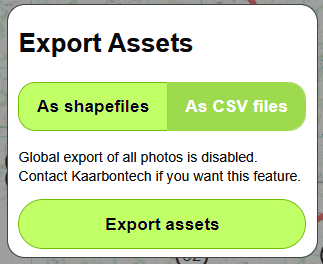
Click Export assets.
The complete asset data is downloaded in a zip file. Click the downloaded zip file in the browser to open it.
The zip file will contain the following files:
Assets
- grass_area
- grass_line
- hedge
- shrub
- strim_point
- strim_line
- weed_patch
Inspections
- insp_grass_area
- insp_grass_line
- insp_hedge
- insp_shrub
- insp_strim_point
- insp_strim_line
- insp_weed_patch
Service Requests
- grass_area_service_requests
- grass_line_service_requests
- hedge_service_requests
- shrub_service_requests
- strim_point_service_requests
- strim_line_service_requests
- weed_patch_service_requests
CSV exports also include a combined_(asset_type).csv file for each asset type that contains the data from both the asset and insp files combined into a single file.